
💬 SMS AI4CALL Configuration
Complete guide to integrate SMS with AI4CALL: send confirmations, reminders and automatic notifications via SMS during calls with prepaid system
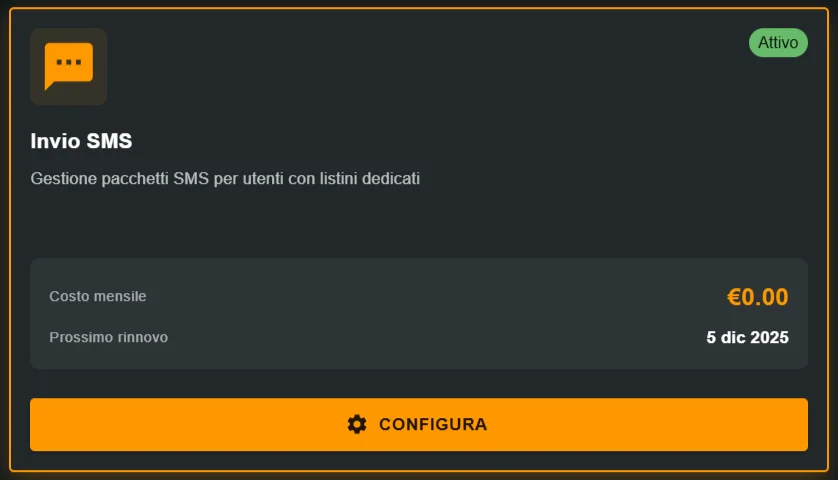
Go to "MARKET" → "Marketplace Plugin" and click Buy on "SMS AI4CALL" → PAY
Go to "MARKET" → "My Plugins" and click Configure on "SMS AI4CALL"
🚀 Quick navigation:
⚠️ Third-party services
The integrations described refer to third-party services.
Rate limits, authentication methods, technical configurations, costs, and policies are defined exclusively by the respective providers and may change over time.
Costs for external services are borne directly by the end user to the service providers themselves and are in no way managed or mediated by our portal (e.g., Meta or other providers for WhatsApp, Zapier, Calendly, etc.).
What it means:
- ❌ You CANNOT customize sender alias with your company name
- ❌ Customer receives SMS with sender "AI4CALL", not "Medical Practice" or "Agency XYZ"
- ⚠️ Technical limitation from SMS provider - currently not modifiable
Recommended workaround:
- ✅ Include company name in the SMS TEXT
- ✅ Example: "AI4CALL for Dental Practice Rossi: appointment confirmed Tuesday 15 at 10 AM"
- ✅ Customer understands origin even with generic sender
Future: custom alias personalization in roadmap - contact AI4CALL support for updates.
Advantages:
- ✅ universal: works on ALL mobile phones (even feature phones without internet)
- ✅ very high delivery rate: 99% guaranteed delivery
- ✅ NO app required: arrives natively
- ✅ low latency: delivery 2-30 seconds
- ✅ high read rate: ~90% SMS read within 3 minutes
Disadvantages:
- ⚠️ paid: €0.035-0.05 per SMS
- ⚠️ 160 characters max (plain text, no media)
- ⚠️ NO native clickable links (only on modern smartphones)
- ⚠️ fixed sender "AI4CALL" currently
When to use SMS:
→ critical urgent notifications (OTP, security alerts)
→ customers without smartphone/WhatsApp
→ backup fallback if WhatsApp/Email fail
→ confirmations where guaranteed delivery is critical
→ senior demographic target (they prefer SMS)
When NOT to use SMS:
→ long messages >160 char (use Email)
→ content with media/images (use WhatsApp)
→ important links to click (use Email/WhatsApp)
→ very high daily volumes (excessive costs)
What SMS integration is and how it works
SMS integration allows the AI4CALL assistant to send text messages to mobile phones during or after calls via mobile operator networks.
→ you buy SMS credit in advance (100, 500, 1000 SMS)
→ each send automatically decrements the counter
→ when they run out: you need to buy a new package
→ prepaid SMS NEVER expire
One-way sending (outbound only):
→ assistant can SEND SMS to customers
→ customers CANNOT reply (number is not bidirectional)
→ ideal for: confirmations, reminders, notifications, alerts
Fixed sender "AI4CALL":
→ all SMS show sender "AI4CALL"
→ NOT customizable with company name currently
→ workaround: include company name in message text
Guaranteed delivery:
→ delivery via mobile operator networks (Vodafone, TIM, Wind, etc.)
→ 99% delivery rate
→ latency 2-30 seconds typically
[Customer calls practice to book]

   ↓

[AI4CALL Assistant handles booking]

   ↓

[Collects: name, mobile number, appointment date/time]

   ↓

[End of call]

   ↓

[AI invokes: send_sms]

   ↓

[Parameters:

  - dst: customer mobile number

  - txt: "AI4CALL for Dr. Rossi Practice: appointment

         confirmed Tuesday 15 March at 10:00.

         Via Roma 1, Milan"]

   ↓

[System sends SMS via mobile operator]

   ↓

[Customer receives SMS within 30 seconds]

   ↓

[Available SMS counter decrements: 90 → 89]
Advantage: immediate confirmation on device customer always has with them (mobile). Works even without smartphone/internet.
Basic Package: 100 SMS at €5.00
→ cost per SMS: €0.05
→ ideal for: testing, occasional use single practice
Standard Package: 500 SMS at €20.00
→ cost per SMS: €0.04
→ ideal for: medium use, small/medium campaigns
Premium Package: 1000 SMS at €35.00
→ cost per SMS: €0.035
→ ideal for: intensive use, high volumes
Attention long messages: if SMS text >160 characters, splits into multiple SMS billed separately
→ 161-320 char = 2 SMS billed
→ 321-480 char = 3 SMS billed
Best practice: keep under 160 characters to maximize efficiency
Buy prepaid SMS package
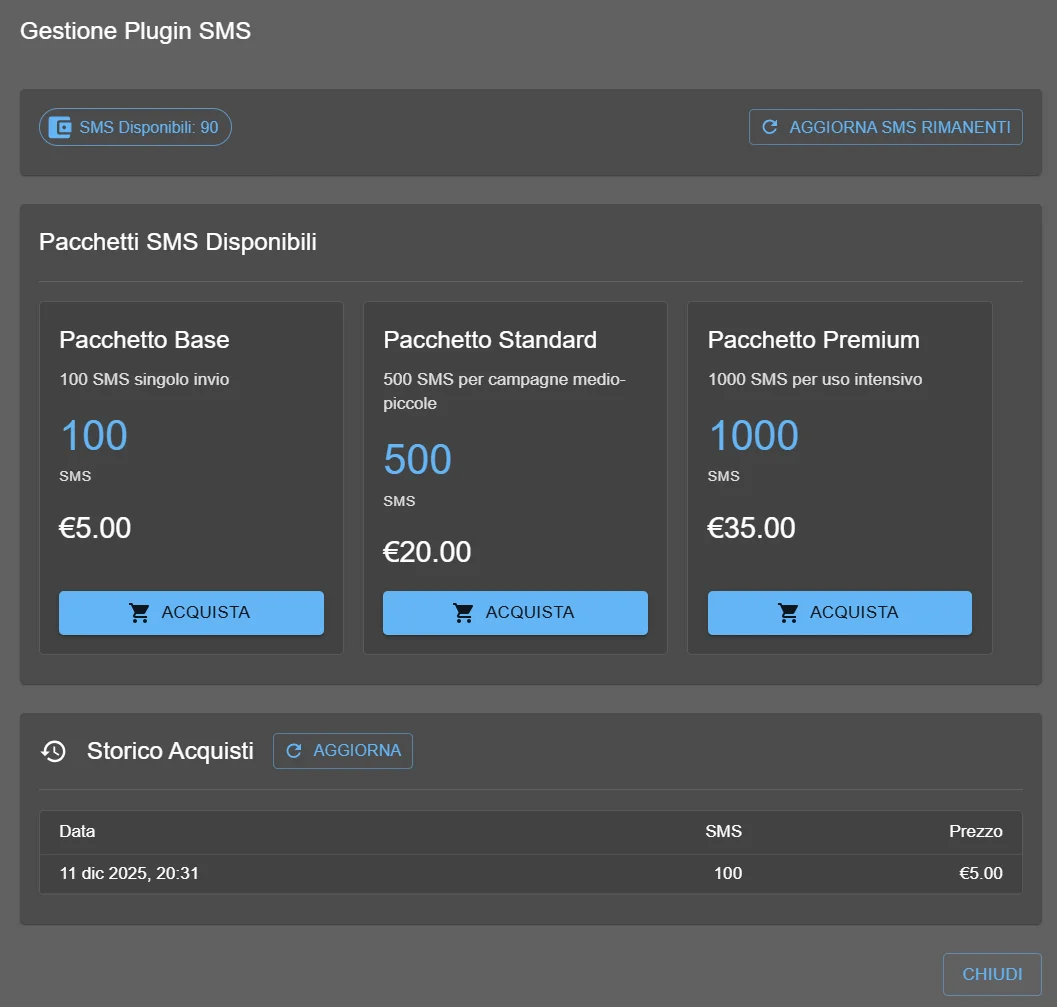
Before you can send SMS you need to purchase credit through one of the available prepaid packages.
- Select "SMS AI4CALL" from your Plugin list
- Section "Available SMS":
→ shows remaining SMS counter (e.g., "90")
→ if 0 or few: recharge needed - Section "Available SMS Packages":
→ displays 3 package cards with details - Choose suitable package:
- Basic 100 SMS €5: test or very limited use
- Standard 500 SMS €20: recommended for start (best value for money)
- Premium 1000 SMS €35: high volumes (>30 SMS/day)
- Click "BUY" button on chosen package
- System redirects to secure payment checkout
- Complete payment (credit card/PayPal/bank transfer)
- After confirmed payment:
→ SMS automatically added to balance
→ "Available SMS" counter updated
→ purchase appears in "Purchase History" - Click "UPDATE REMAINING SMS" if counter doesn't refresh automatically
- ✅ Available SMS: count updated (e.g., 90 → 590 if purchased Standard)
- ✅ Purchase History: new row with date, SMS purchased, price
- ✅ send_sms tool now functional
Note: prepaid SMS NEVER expire. You can purchase multiple times - credit sums up.
Example: you have 90 SMS, purchase Standard 500 → total becomes 590 available SMS.
Formula: (calls/day × % that receive SMS × working days/month)
Example Medical Practice:
→ 20 appointments/day
→ 80% customers receive SMS confirmation
→ 22 working days/month
→ requirement: 20 × 0.8 × 22 = 352 SMS/month
→ recommended package: Standard 500 SMS (covers 1+ month)
Example Insurance Agency:
→ 50 calls/day
→ 30% receive SMS (others prefer email)
→ 22 working days/month
→ requirement: 50 × 0.3 × 22 = 330 SMS/month
→ recommended package: Standard 500 SMS
Advice: start with Standard 500, monitor first month consumption, adapt afterwards.
Enable send_sms tool
After purchasing SMS credit, enable the send_sms tool to allow the assistant to send messages.
- Select "SMS" from your plugin list:
→ see send_sms tool with checkbox
→ description: "Send an SMS message via BeeVoIP or specified alias" - Select ☑️ send_sms checkbox
- Tool parameters visible:
- alias: sender alias (default: ai4call) - FIXED currently
- dst: destination number (mandatory)
- txt: SMS message text (mandatory)
- Click "SAVE CONFIGURATION"
- ✅ send_sms tool now available for assistant!
- ✅ send_sms checkbox selected
- ✅ available SMS credit >0
- ✅ tool ready for use in prompt
Quick test: call assistant, ask "send me test SMS". You should receive message within 30 seconds.
→ even if present in configuration, it is NOT modifiable
→ all SMS sent show sender "AI4CALL"
→ specifying different alias in tool call has no effect
Implication: DO NOT waste time trying to customize alias - it won't work.
Solution: include company identification in SMS TEXT, not in alias.
Optimize SMS text for maximum effectiveness
SMS has 160 character limit - every word counts. Optimize text to maximize useful information minimizing costs.
✅ GOOD Example (152 characters):
AI4CALL for Dr. Rossi Practice: appointment Tuesday 15 March at 10:00, Via Roma 1 Milan. For cancellation call 02-1234567
❌ BAD Example (187 characters = 2 SMS billed!):
AI4CALL for Dr. Rossi Dental Practice: dear customer, we confirm your appointment is scheduled for Tuesday 15 March 2025 at 10:00 AM at our practice
Intelligent abbreviation techniques:
- "appointment" → "appt." (save 10 char)
- "dear customer" → omit (save 15 char)
- "2025" → omit year if obvious (save 5 char)
- "at our practice" → direct address (save 15 char)
- "we confirm that" → omit excessive formality
Effective SMS structure:
1. Identification: "AI4CALL for [Company Name]:" (20-30 char)
2. Core message: main action/info (60-80 char)
3. Essential details: date/time/location (40-50 char)
4. Call-to-action: what to do if needed (20-30 char)
AI4CALL for [Company]: appt. [day] [date] at [hh:mm], [address]. Cancellation: [phone]
→ example: "AI4CALL for Rossi Practice: appt. Tue 15/3 at 10:00, Via Roma 1 MI. Cancellation: 02-123456"
Template 2 - 24h reminder (142 char):
AI4CALL for [Company]: REMINDER appt. tomorrow [date] at [hh:mm]. Confirm attendance: [phone]
Template 3 - OTP code (89 char):
AI4CALL [Company]: verification code [123456]. Valid 5 min. DO NOT share
Template 4 - Urgent notification (125 char):
AI4CALL for [Company]: [brief urgent message]. Contact us: [phone] or [email]
AVOID emoji (reduce limit to 70 char!):
❌ 😀❤️✅📅 → trigger UCS-2 encoding, max 70 char per SMS
✅ use text: "OK", "attention", "reminder" instead
Careful with accented letters (OK but expensive):
⚠️ à è ì ò ù → supported but reduce efficiency
✅ alternative if critical: "e'" instead of "è"
AVOID non-standard special characters:
❌ mathematical symbols ∑∏≠
❌ Cyrillic/Arabic/Chinese characters (unless recipient supports)
✅ stick to: letters A-Z, numbers 0-9, basic punctuation
Instruct the assistant for SMS workflows
Configure the assistant prompt to correctly use send_sms with multi-channel fallback and cost optimization.
"SMS text MUST be <160 characters. Use template: 'AI4CALL for [Company]: appt. [day] [date] at [hh:mm], [short address]. Info: [tel]'. Abbreviate intelligently: 'appointment'→'appt.', omit unnecessary formalities. Count characters BEFORE send_sms - if >160, shorten further."
- Call assistant from your mobile
- Simulate booking: name, date, time
- Ask: "Send me SMS confirmation"
- Verify: SMS received within 30 seconds
- Check dashboard: Available SMS decremented
- Verify text: <160 char, sender "AI4CALL", correct info
Test 2 - Multi-channel fallback:
- Simulate customer without WhatsApp (provide only mobile number + email)
- Assistant should attempt WhatsApp → fails
- Automatic fallback to Email
- If Email fails → SMS as last resort
Test 3 - Exhausted credit management:
- Wait for remaining SMS = 0 (or simulate)
- Request SMS sending
- Verify: assistant does NOT communicate error
- Verify: silent fallback to Email
- Customer receives confirmation via Email without issues
🛠️ send_sms Tool
Technical specifications of MCP tool for sending SMS.
send_sms
Parameters:
alias(string, default: "ai4call"): SMS sender - FIXED "AI4CALL" currently, not customizabledst(mandatory, string): destination number international format (e.g., "+393331234567")txt(mandatory, string): SMS message text - max 160 characters recommended
Example 1 - Appointment confirmation:
send_sms(
  dst="+393331234567",
  txt="AI4CALL for Rossi Practice: appt. Tue 15/3 at 10:00, Via Roma 1 MI. Cancellation: 02-123456"
)
Example 2 - OTP code:
send_sms(
  dst="+393331234567",
  txt="AI4CALL Medical Practice: verification code 847392. Valid 5 min. DO NOT share"
)
Expected response:
- ✅ Success:
{"status": "sent", "message_id": "..."} - ❌ Credit error:
{"error": "insufficient SMS credit"} - ❌ Number error:
{"error": "invalid destination number"}
Important notes:
- ⚠️ Sender ALWAYS "AI4CALL" - alias parameter ignored currently
- ⚠️ Text >160 char → multiple SMS billed (2 SMS if 161-320 char, 3 SMS if 321-480 char)
- ⚠️ Emoji characters reduce limit to ~70 char per SMS
- ⚠️ Each send decrements available SMS counter
- ⚠️ Typical delivery: 2-30 seconds
❓ Frequently Asked Questions
Answers to most common questions about SMS integration
Prepaid package system: you buy SMS credit in advance, assistant consumes when sending. Available packages: Basic 100 SMS €5 (€0.05/SMS), Standard 500 SMS €20 (€0.04/SMS), Premium 1000 SMS €35 (€0.035/SMS). Dashboard shows remaining SMS in real-time. When exhausted: send_sms tool fails, assistant must inform customer and use alternative method (email/WhatsApp). Recharge: buy new package, credit sums up. Expiry: prepaid SMS NEVER expire.
Currently NO. Sender alias is FIXED: "AI4CALL" for all SMS sent via platform. Customer receives SMS with sender "AI4CALL", not your personalized company name. Technical limitation from SMS provider. Future: possible custom alias personalization (e.g., "Medical Practice", "Agency XYZ") - contact AI4CALL support for roadmap updates. Workaround: include company name in SMS TEXT: "AI4CALL for Medical Practice: appointment confirmed..."
Standard limit: 160 characters per single SMS (GSM-7 encoding). If exceeded: system automatically splits into multiple concatenated SMS (max 153 char each for overhead). Examples: 161 char = 2 SMS billed, 320 char = 3 SMS. Special characters (emoji, accents) reduce limit to ~70 char per SMS (UCS-2 encoding). Best practice: keep under 160 characters, avoid emoji to maximize cost efficiency. Character count: AI4CALL shows length preview before sending.
AI4CALL Dashboard → SMS Plugin Management shows: (1) Available SMS: real-time count (e.g., "90"), (2) Purchase History: table of purchase dates, SMS purchased, price paid, (3) "UPDATE REMAINING SMS" button for manual refresh. Each send_sms tool call automatically decrements counter. For detailed analytics: export AI4CALL call logs, filter by tool="send_sms", count occurrences per period/customer/campaign. Automatic alerts: set notification when SMS <20 to recharge in time.
send_sms tool returns error. Try to handle gracefully by sending WhatsApp, email or saving error and communicating to user "you will receive confirmation shortly".
Yes. SMS can contain links. On older phones the link may not be clickable, while on modern smartphones it is automatically clickable. In any case it is recommended to use short URLs (short links) to save characters.
send_sms tool sends IMMEDIATELY - NO native scheduling. For scheduled sending: (1) integrate with n8n/Zapier which supports delay, (2) AI saves data + desired timestamp to database, (3) cron job reads database, (4) when timestamp arrives: automatically invokes send_sms. Example appointment reminder: (1) appointment booked March 15, (2) save event + reminder_timestamp = March 14 10:00 AM, (3) daily cron at 10:00 checks pending reminders, (4) sends SMS "Reminder: appointment tomorrow at 15:00".
Almost instantaneous. Typical latency: 2-30 seconds from send_sms invocation to customer reception. Delay factors: (1) recipient mobile operator network (coverage area), (2) phone on/off (if off: delivery upon power on), (3) international roaming (higher delays), (4) network congestion (mass events, New Year). Delivery rate: 99% within 60 seconds, 99.9% within 5 minutes. If SMS doesn't arrive: verify correct number international format (+39...), customer in coverage area, phone not blocked.
By default NO. Contact AI4CALL support for information about international packages.
NO. Current system is SEND-ONLY (sending only). Customer CANNOT reply to SMS received from "AI4CALL" - sender number is not bidirectional. For bidirectional conversations: use WhatsApp (supports native replies) or provide company phone number in SMS text: "To reply call 02-12345678". Future: possible dedicated bidirectional SMS number with reply webhooks - contact AI4CALL support for roadmap. SMS ideal for: one-way notifications, confirmations, alerts, reminders.
GSM-7 encoding (standard): supports letters A-Z, numbers 0-9, basic punctuation (. , ! ? - ( ) ), symbols €£$@. NOT supported/problematic characters: emoji (😀❤️ = encoding error or expensive UCS-2 fallback), Italian accented letters (à è ì ò ù = OK but reduce limit 160→70 char), Cyrillic/Arabic/Chinese characters (only if recipient supports). Best practice: use only standard ASCII, avoid emoji, replace "è" with "e'" if possible, test with real number before production.
Yes, SMS ideal for OTP (One-Time Password). Secure workflow: (1) generate random 6-digit code, (2) save in database with timestamp + user_id, (3) send_sms(text="Verification code: 123456. Valid 5 minutes"), (4) user enters code in app/web, (5) verify match database + not expired. OTP best practice: (1) numeric 6-digit code (easy to type), (2) expiry 5-10 min, (3) rate limit attempts (max 3), (4) include service name: "AI4CALL Medical Practice code: 123456", (5) post-use invalidation.
Cost per single SMS: €0.035-0.05 (depends on purchased package). Long messages: if >160 char, split into multiple SMS billed separately. Calculation example: 320 character message = 3 SMS = €0.15 total (Premium package €0.035×3). Cost optimization: (1) keep under 160 char, (2) avoid emoji (reduce to 70 char), (3) use acceptable abbreviations ("appointment" → "appt."), (4) consider Email/WhatsApp for long messages (free unlimited). ROI: compare SMS cost vs customer value/conversion.
Troubleshooting checklist: (1) verify SMS-AI4CALL availability, (2) check number format: international prefix +39 for Italy, no spaces/dashes, (3) SMS text: <160 char, no invalid characters, (4) AI4CALL Tool Response: look for send_sms tool errors (insufficient credit or other).