
Page index
Quick checklist for the technician
- ☐ SIP Host: sip.freepbx.ai4call.com:5060
- ☐ Codec: alaw (G.711 PCMA)
- ☐ No registration (IP authentication)
- ☐ In TO (Request-URI user-part) insert API-KEY or Virtual Number
- ☐ IP to whitelist: 135.220.1.3/32
SIP trunk configuration to AI4CALL via FreePBX AI4CALL module
If you use the FreePBX module developed by AI4CALL, trunk creation is simplified via graphical interface.
PJSIP Trunk creation procedure on FreePBX from AI4CALL Module
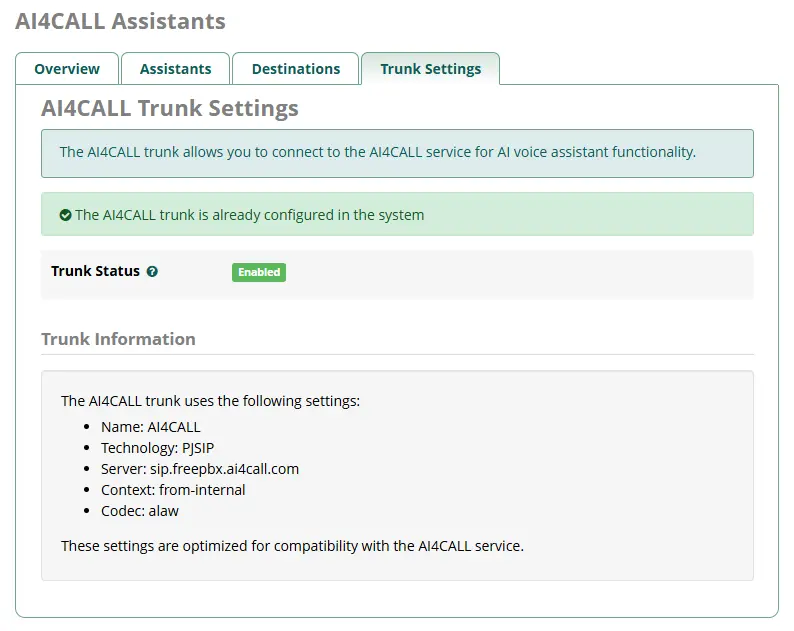
Go to the installation and configuration page of the FreePBX Module for AI4call
Manual SIP trunk configuration to AI4CALL (FreePBX → Trunk)
If you don't use our module or want to configure the trunk manually, follow these steps.
PJSIP Trunk creation procedure on FreePBX (manually)
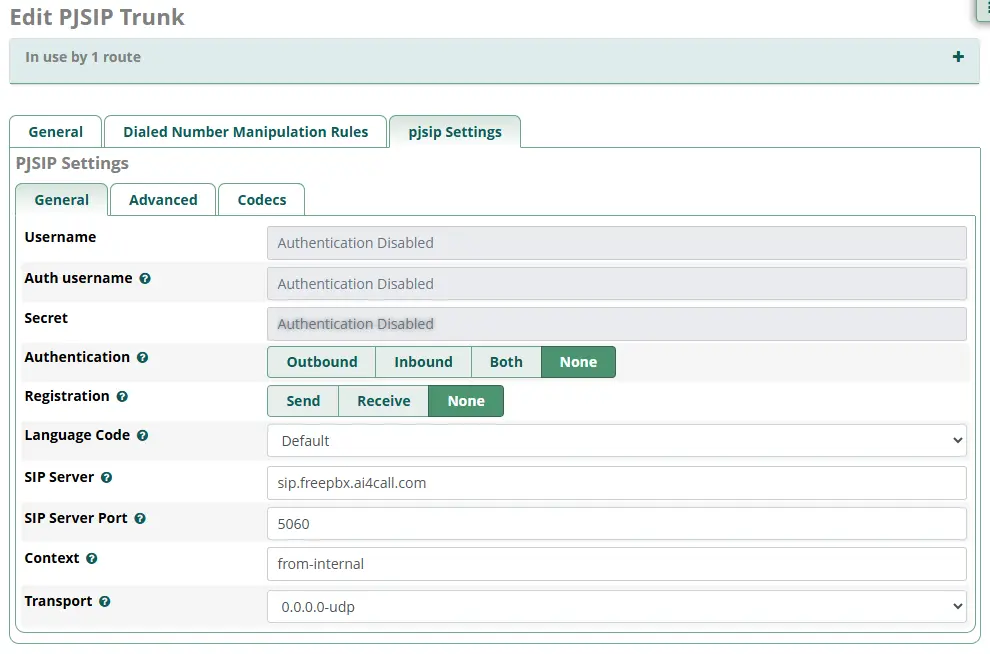
- Connectivity → Trunks → Add PJSIP Trunk
- Trunk Name: AI4CALL
- Outbound CallerID: <your number>
- SIP Server: sip.freepbx.ai4call.com
- SIP Server Port: 5060
- Authentication: None
- Registration: None
- From_user (in Advanced SIP Settings): AI4CALL
- Context: from-trunk-ai4call
- Codecs: alaw (check only alaw)
- Match (Permit): 135.220.1.3/32
- Connectivity → Outbound Routes → Add Route
- Route Name: to-ai4call
- Trunk Sequence: AI4CALL
- Dial Patterns: X.
- Additional "TO" field (or prepend): Assistant API-KEY
- Save → Apply Config.
Configuration for other PBXs (Generic)
Instructions valid for any PBX (Asterisk, 3CX, Yeastar, Grandstream, etc.) that supports the standard SIP protocol. Follow the parameters indicated below to ensure compatibility.
SIP Trunk creation procedure for any PBX
Standard parameters for SIP trunk to AI4CALL
- type: SIP/PJSIP without registration
- host: sip.freepbx.ai4call.com
- port: 5060 UDP
- fromuser: AI4CALL
- codec: G.711 alaw (PCMA)
- dtmf: RFC2833
- nat: yes (if PBX is behind NAT)
- qualify: no
- IP to whitelist: 135.220.1.3/32
Send outbound calls to AI4CALL by inserting in the TO field (Request-URI) the API-KEY or Virtual Number of the assistant.
Example dial string:
ai4call_sk_xxxx7xx@sip.freepbx.ai4call.com:5060
or
00000391234567@sip.freepbx.ai4call.com:5060
Notes for main PBXs
- 3CX: create "SIP Gateway" → type "No Registration", host=sip.freepbx.ai4call.com, codec=alaw; in "Outbound Rules" put "Strip 0" and "Prefix" = API-KEY.
- Yeastar: PBX → VoIP Trunks → New SIP Trunk → Provider "Generic", same parameters; in "Outbound Route" use "Prepend" = API-KEY.
- Raw Asterisk:
[AI4CALL]
type=peer
host=sip.freepbx.ai4call.com
port=5060
fromdomain=AI4CALL
disallow=all
allow=alaw
context=from-ai4call
insecure=port,invite
qualify=no
Dial-string example:
Dial(PJSIP/ai4call_sk_xxxx7xx@AI4CALL/${EXTEN})
Frequently Asked Questions on SIP Trunk Configuration
API-KEY uniquely identifies the assistant; Virtual Number is a geographic number associated with the same assistant. Use one or the other in TO depending on how you want to manage routing on the AI4CALL side.
Currently AI4CALL only accepts alaw. Additional codecs will be enabled in the future.
No. We use static IP authentication; just insert our host without user/password.
We accept traffic only from your PBX IP (configurable in our panel).