
Assieasy Connector Configuration

Complete guide to integrate Assieasy with AI4CALL: consult customer records, policies, documents and send certificates automatically
AI4CALL - MCP Assieasy Connector Configuration

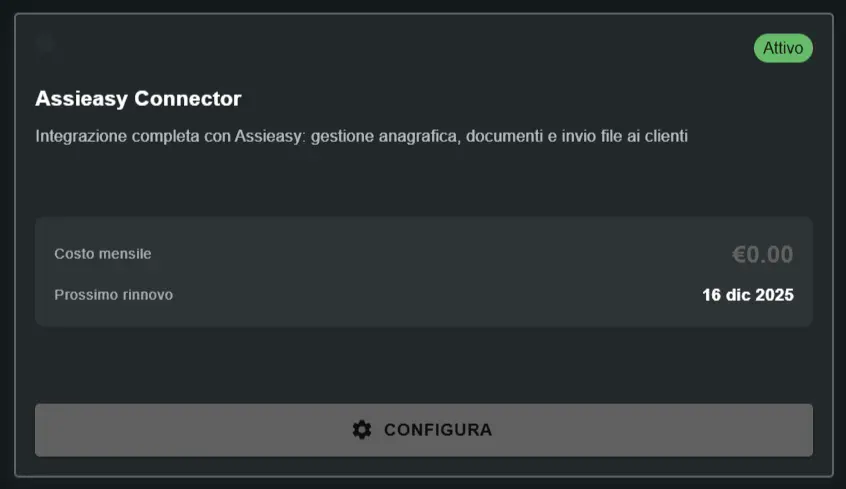
Go to MARKET โ†’ Marketplace Plugin and click on Purchase on Assieasy Connector โ†’ FREE. Go to MARKET โ†’ My Plugins and click on Configure on Assieasy Connector

โš ๏ธ Third-party services

The integrations described refer to third-party services.
Rate limits, authentication methods, technical configurations, costs, and policies are defined exclusively by the respective providers and may change over time.

Costs for external services are borne directly by the end user to the service providers themselves and are in no way managed or mediated by our portal (e.g., Meta or other providers for WhatsApp, Zapier, Calendly, etc.).

โš ๏ธ IMPORTANT - READ ONLY + Send Integration
The assistant can CONSULT Assieasy data and SEND documents, but CANNOT modify them. Allowed operations: search customers by phone number, read active policies and expirations, list available documents, send documents via email. NOT allowed operations: create/modify customer records, issue new policies, modify premiums or coverage, delete policies or documents, register payments, manage claims. For critical operations: the assistant transfers call to human agent.

1

What is Assieasy and how it integrates with AI4CALL

Assieasy is a complete cloud management system for insurance agencies that centralizes customer records, policy portfolio, expiration schedules, documents and communications with companies.

๐Ÿข Assieasy features:
Record management: customer database with personal data, contacts, identity documents, interaction history, preferences, agent notes. Policy portfolio: all customer policies (car, home, life, accident, liability, etc.), company details, policy number, premium, expiration, coverage, automatic expiration schedule with renewal alerts. Document archive: PDF policies, receipts, quotes, certificates, green cards, company communications, claim documents, secure cloud storage and searchable. Multi-company: integrated with all major companies, comparative quoting.
๐Ÿ’ก How AI4CALL uses Assieasy
Typical workflow: customer calls, assistant responds, searches customer by phone, obtains data, customer requests policy info, assistant retrieves policies, communicates expirations, upon request sends documents via email. Advantage: customer gets info and documents instantly without waiting for human agent.
๐Ÿ”’ Privacy and GDPR
Insurance data is sensitive - respect privacy. Best practices: verify customer identity BEFORE communicating policy data, do not communicate premiums/coverage to unauthorized third parties, log Assieasy accesses for audit trail, instruct AI not to record sensitive data in public transcripts, documents sent only to email configured in Assieasy. GDPR compliance: Assieasy is GDPR-compliant, integration inherits compliance if used correctly.
2

Get Assieasy API credentials

To integrate AI4CALL with Assieasy you need 3 credentials: API Username, API Password and Secret.

๐ŸŽฏ how to obtain credentials:
Contact Assieasy support, request API activation and credential generation, support provides credentials and instructions.
โœ… Credentials obtained!
You should have: Assieasy Username (e.g. api_user@agency.com), Assieasy Password (alphanumeric), Secret (long key). Keep securely - these are the keys to access the entire customer and policy database!
๐Ÿ” API credentials security
Assieasy API credentials guarantee complete access to sensitive customer data. Mandatory protection: DO NOT share with unauthorized personnel, DO NOT commit to Git repositories or public documents, store in enterprise password manager, access only to authorized admin/technicians, regenerate periodically. If credentials compromised: contact Assieasy administrator immediately for revocation and regeneration.
3

Configure Assieasy in AI4CALL

Insert Assieasy credentials in AI4CALL to enable integration.
โš™๏ธ configuration procedure:
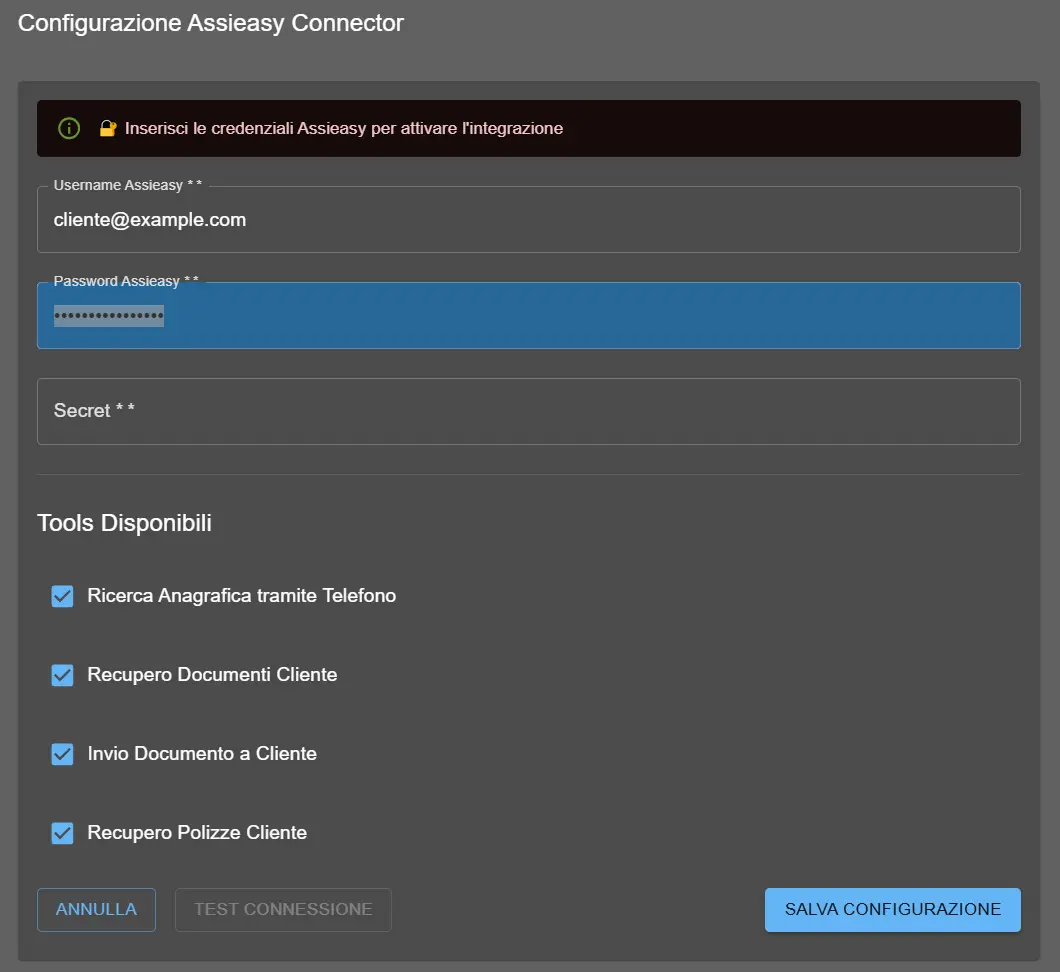
Select Assieasy Connector from Plugin list, insert Username, Password and Secret, verify no extra spaces, click TEST CONNECTION, if OK save configuration.
โœ… Connection test successful
If connection test returns success: correct credentials, Assieasy API reachable, authentication working, tools ready for use. Proceed with tool selection to enable!
โŒ Troubleshooting failed connection test
Error 401 Unauthorized: verify credentials, no extra spaces, credentials not expired. Timeout Error: verify server online, firewall, API URL. API disabled error: contact Assieasy support to activate API.
AI4CALL - MCP Assieasy Connector Configuration
"Assieasy Connector Configuration" panel: entering Username, Password, Secret and selecting Available Tools
4

Select available tools for the assistant

Choose which Assieasy operations to enable for the AI assistant via checkbox.

๐Ÿ› ๏ธ configurable Assieasy tools:
1. Customer Search via Phone: search customer by phone, returns customer_id and data. FUNDAMENTAL - prerequisite for other tools. 2. Customer Documents Retrieval: list stored documents. 3. Send Document to Customer: send document via email. Requires Document Retrieval. 4. Customer Policies Retrieval: list all policies with details.
๐Ÿ’ก Recommended configurations
COMPLETE Setup: enable all 4 tools for complete experience. CONSULTATION ONLY Setup: disable Document Send. POLICY INFO Setup: only Search + Policy Retrieval.
โš™๏ธ Tool dependencies
Customer Search: prerequisite for ALL other tools (needs customer_id). Document Send: requires Document Retrieval enabled. Best practice: enable all 4, disable only for specific policy/security reasons.
5

Instruct the assistant for Assieasy workflow

Configure the assistant prompt to correctly use Assieasy tools in insurance workflows.

๐Ÿ“ Recommended workflows to insert in prompt
1. Policy expiration verification + certificate sending: search customer, retrieve policies, identify policy, communicate expiration, upon request retrieve and send certificate. 2. Portfolio summary: search customer, retrieve policies, list by type, identify upcoming expirations. 3. Document sending: search customer, retrieve documents, filter by type, send specific document. 4. Identity verification: always verify with birth date or tax code before communicating policy details.
๐Ÿงช Complete workflow test
Test 1 - Customer search: call from registered number, verify recognition. Test 2 - Policy info: ask expiration, verify correct response. Test 3 - Document send: request certificate, verify email received. Test 4 - Customer not found: call from unregistered number, verify elegant handling.


โ“ Frequently Asked Questions

Answers to the most common questions about Assieasy Connector

Assieasy is a cloud management system for insurance agencies that allows managing customers, policies and documents. The integration allows the AI phone assistant to consult insurance data and documents exclusively after customer authentication via PIN, according to the rules defined in the use case.

API credentials (e.g. username, password, secret or token) must be requested directly from Assieasy technical support. Availability and activation methods depend on the contract signed with the provider.

Identification occurs via the caller's phone number, while data access occurs only after verification of the personal 6-digit PIN. Without a valid PIN associated with the caller number, the assistant cannot provide personal or contractual information.

After valid authentication, the assistant can: consult active policies and expirations, retrieve documents associated with the customer, send documents via email to the registered address. The integration is read-only and does not allow data modifications.

No. The assistant cannot create, modify or delete policies, nor update demographic data or register payments. For these operations, human operator intervention or use of broker/company official channels is required.

Documents are sent via email using the address registered in Assieasy. Email configuration, templates and sender are managed by the Assieasy system or the configured mail provider.

If the number is not present in records or not associated with a valid PIN, the assistant does not provide personal information and may limit itself to providing generic information or directing the customer to an operator.

No. Claims management and policy renewals require complex processes and formal validations. The assistant can only provide general information or direct the customer to the competent official channels.

Any usage limits, costs, API policies and contractual conditions are defined exclusively by Assieasy. Third-party service costs are borne by the end user and are not managed by our portal.


Some of the ai4call users