
AI4CALL Dashboard
The main dashboard provides an overview of your AI4CALL account: available credit, configured assistants, active tools and latest calls received. Quickly access main functions via quick actions.
Dashboard Header
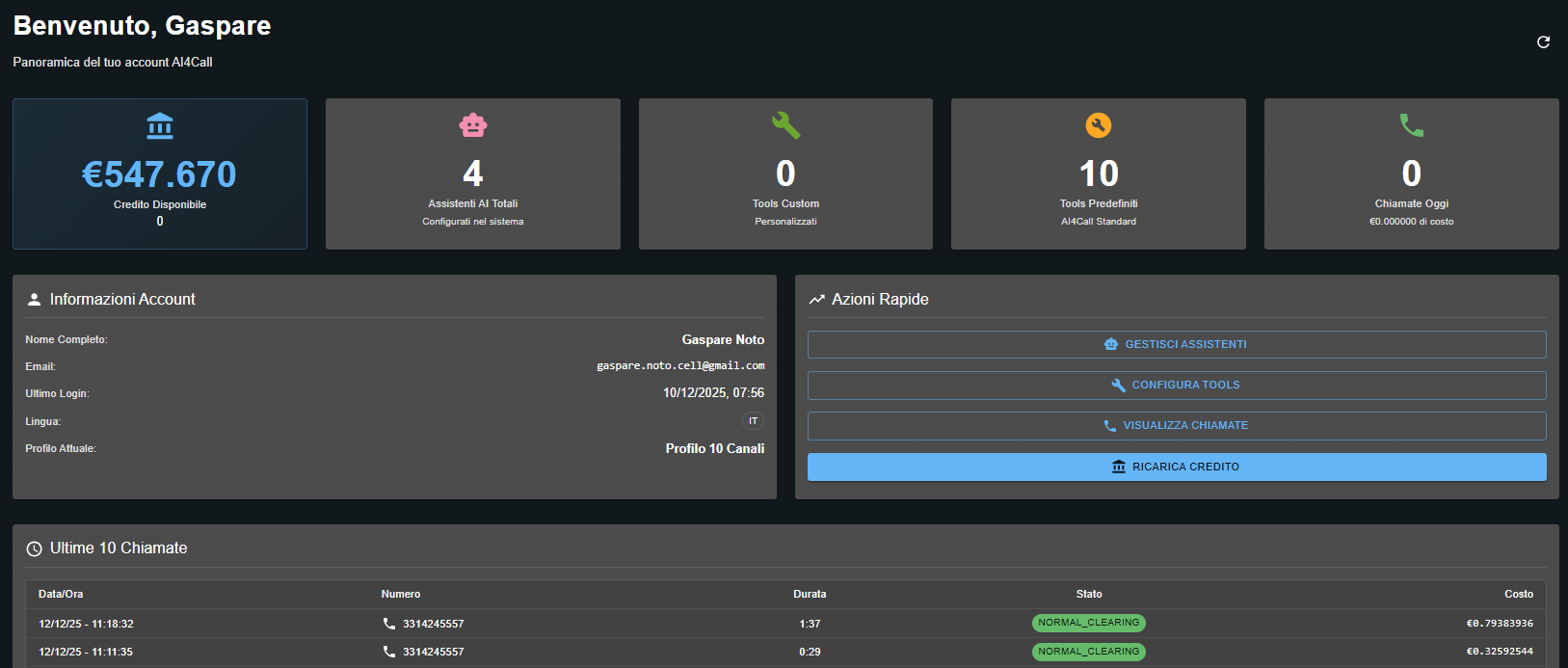
Welcome Message
Custom header with username: "Welcome, [Name]"
Subtitle: "Overview of your AI4Call account"
Refresh Button
Circular icon ⟳ at top right to manually refresh dashboard data without reloading the page.
Main Metrics Cards
Five horizontal cards show your account's key metrics in real time.
Available Credit
€547.670
Total AI Assistants
4
Configured in the system
Total number of AI assistants you have created and configured in your account.
Custom Tools
0
Customized
Number of custom tools you have developed and uploaded to the system.
Default Tools
10
AI4Call Standard
Number of AI4CALL standard tools you have enabled and configured for your assistants.
Calls Today
0
€0.000000 cost
Number of calls received today and total cost incurred on the current day.
Account Information
👤 Profile Details
Section with detailed information about your personal account:
Quick Actions
⚡ Quick Access Buttons
Four buttons to quickly access main platform functions without navigating through menus.
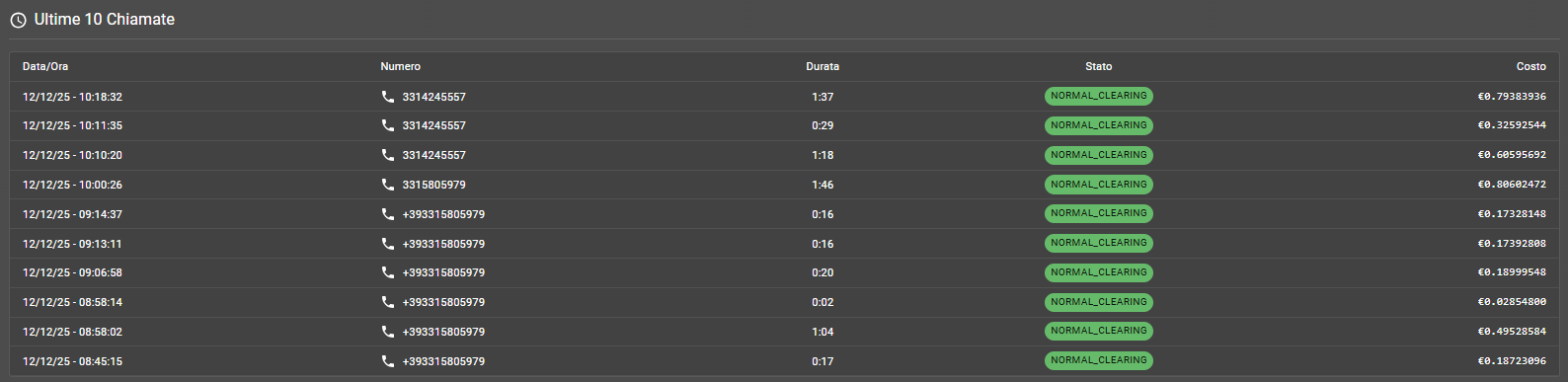
Last 10 Calls
🕐 Recent Calls
Table showing the last 10 calls received in descending chronological order (most recent at top).
NOTE: displayed amounts are VAT inclusive
Metrics Interpretation
💰 Available Credit
Reading: €547.670 available.
Means: you have sufficient prepaid credit to handle calls.
Action: if credit falls below a critical threshold for your needs, use "TOP-UP CREDIT".
🤖 Total AI Assistants: 4
Means: you have configured 4 distinct AI assistants in your account.
Typical usage: you might have an assistant for customer support, one for bookings, one for sales and one for testing.
Limit: depends on your plan. Check in "Current Profile" if you can add more.
🔧 Custom Tools: 0 vs Default Tools: 10
Means: you have not developed custom tools, but are using 10 AI4CALL standard tools.
Default tools examples: Google Calendar, SMS sending, database lookup, call transfer, custom webhook.
Custom tools: Tools you develop for specific integrations of your business.
📞 Calls Today: 0 (€0.000000)
Means: no calls received on the current day (resets at midnight).
Usage: monitor daily traffic and costs incurred for budgeting and trend analysis.
Click the blue "TOP-UP CREDIT" button in Quick Actions. The page to purchase credit via credit card will open.
Yes. The dashboard shows only the last 10 for performance reasons. Click "VIEW CALLS" in Quick Actions to access the complete history with advanced filters for date, number, status, duration and cost.
"10 Channels" refers to the number of simultaneous calls, not the number of assistants. You can create unlimited assistants (or according to plan limits), but maximum 10 calls can be active concurrently.
Default Tools are standard AI4CALL functionalities (Google Calendar, SMS, webhook, etc.). Custom Tools are personalized integrations you develop for specific needs of your business.
Yes. The current language shown in "Account Information" (EN) can be changed in account settings. Typically available languages: EN, IT, ES, FR.
At midnight (00:00) UTC. Each day starts with counter at zero to monitor daily traffic.
Yes, clicking ⟳ updates all metrics including available credit, assistants, calls today and recent calls. Useful if you have just topped up credit or completed configurations.