
Phone Number Routing Management
Assign your AI assistants to demo or acquired phone numbers
What is Routing?
Routing allows you to link a phone number to a specific AI assistant. When a user calls that number, the assigned assistant will answer the call.
AI4CALL Number Routing:
- Demo Numbers: free trial numbers to test assistants
- Acquired Numbers: permanent numbers activated for your company
Field descriptions
The management table shows the following information:
- Phone Number: The assigned phone number
- Current API Key: API key of the currently assigned assistant
- Assistant Name: Name of the AI assistant linked to the number
- Assignment Date: Date when the assistant was assigned
- Select Assistant: Dropdown menu to change assistant
- Actions: "RELEASE" button to free the number
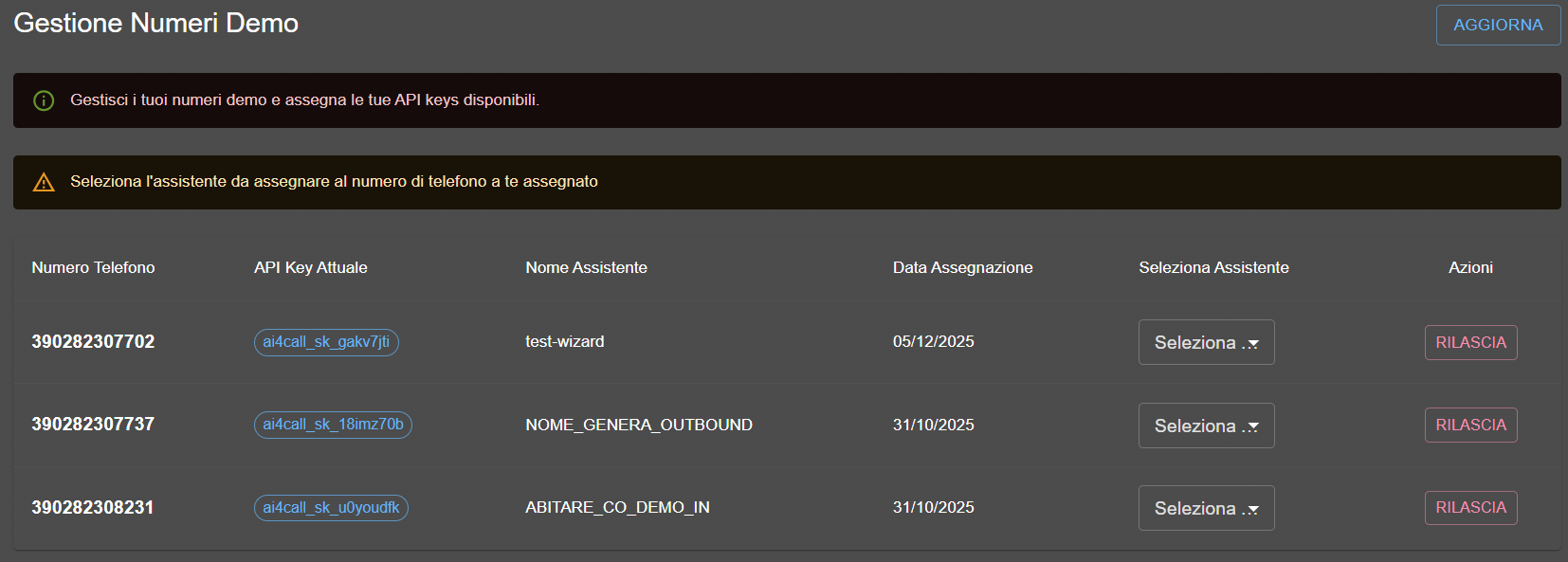
Phone number routing management table
How to assign an assistant
Follow these steps to configure routing:
- Go to the "AI4CALL Numbers" menu > "Routing"
- Select the "DEMO NUMBERS" or "ACQUIRED NUMBERS" tab
- From the "Select Assistant" dropdown, choose the assistant to assign
- Assignment is saved automatically
Number release
You can release a number by clicking the "RELEASE" button. The number will become available for future assignments.
Warning: release immediately disconnects the assistant from the number.
No. A number can be assigned to only one assistant.
The demo number becomes available again and can be reassigned at any time.
Call the assigned phone number: the AI assistant will answer according to the configured settings.